Streamline Bookings and Boost Efficiency with Google Business Profile for HVAC and Appliance Repair
In today’s competitive HVAC and appliance repair market, convenience is king. Customers expect a seamless experience, from booking appointments to getting their repairs fixed quickly. That’s where Google Business Profile (formerly Google My Business) steps in. By leveraging its booking and appointment features, you can turn those online searches into booked appointments, saving you time and keeping your customers happy.
This guide will walk you through setting up Google Business Profile bookings and appointments specifically for HVAC and appliance repair businesses. We’ll ditch the technical jargon and focus on what matters most: getting more qualified leads and streamlining your appointment scheduling process.
Get More Bookings with Google Reserve (if it's available in your area)
Frustrated with customers calling around or struggling to schedule appointments on your website? Google Reserve (if available in your area) can be a game-changer for HVAC and appliance repair businesses. It allows potential customers to book appointments directly through your Google Business Profile, simplifying the process and boosting your booking rates.
However, there’s a catch: Google Reserve isn’t currently available for all businesses. This guide will explain eligibility requirements and how to check if you can leverage Google Reserve to streamline your appointment scheduling (and hopefully avoid that dreaded “not eligible” message!).
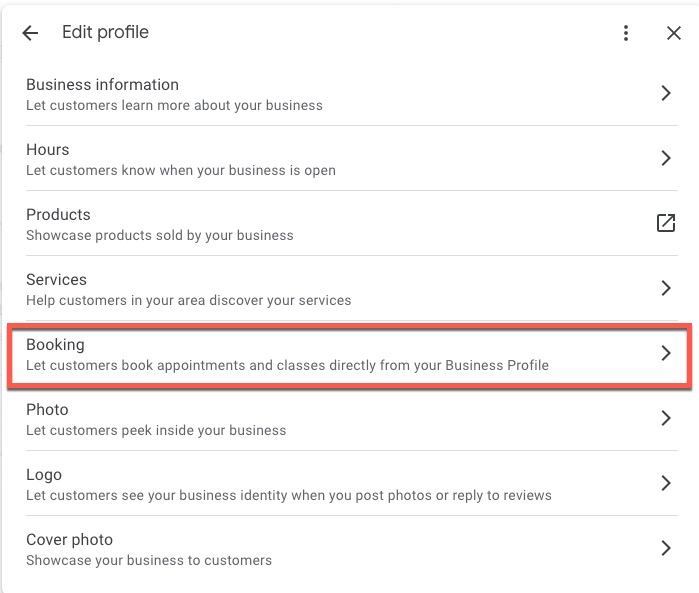
Which third-party platforms connect to Reserve with Google?
Simplify Scheduling with Google Reserve and Compatible Platforms
Tired of juggling phone calls and emails for appointment scheduling? Google Reserve (if available in your area) can be a lifesaver for HVAC and appliance repair businesses. It lets customers book directly through your Google Business Profile, but the magic doesn’t stop there.
The Power of Compatibility: Reserve with Google integrates with several popular scheduling platforms, including Appointy, Bookeo, Square Appointments, and more. This means you can ditch the scheduling headaches and leverage the power of both systems:
- Seamless Booking Experience: Customers see your available appointment slots directly on your Google Business Profile. They can easily book an appointment that fits their schedule, eliminating the need to call or visit your website.
- Centralized Management: The bookings made through Google Reserve flow directly into your existing compatible scheduling platform. You manage all appointments in one familiar place, saving you time and reducing the risk of missed bookings.
- Streamlined Communication: Some platforms even allow for automated appointment confirmations and reminders sent directly through Google. This keeps both you and your customers informed and reduces the chances of no-shows.
Finding the Perfect Fit: With a variety of compatible platforms like Appointy, Bookeo, and Square Appointments, there’s an option to suit most HVAC and appliance repair businesses. Each platform offers unique features, so consider factors like:
- Ease of Use: How user-friendly is the platform for both you and your staff?
- Features: Does the platform offer functionalities specific to your business needs, like job scheduling or online payment processing?
- Integration Complexity: How easily does the platform integrate with Google Reserve?
Compatible Platforms for Streamlined Scheduling with Google Reserve
While Google Reserve simplifies booking for your customers, choosing the right compatible platform for your HVAC and appliance repair business is key to maximizing efficiency. Here’s a breakdown of some popular options:
Appointy: This user-friendly platform caters to a wide range of businesses, including HVAC and appliance repair. It allows you to create different appointment types (e.g., diagnosis, repair), manage staff schedules, and accept online payments. Appointy integrates seamlessly with Google Reserve, ensuring your available slots are reflected on your Business Profile and bookings flow directly into your Appointy calendar.
Bookeo: Designed for service providers like yours, Bookeo offers powerful scheduling features. You can define service durations, set buffer times between appointments, and even manage recurring jobs. Bookeo also integrates with Google Reserve, allowing customers to book directly through your Business Profile. Bookings are then synced with your Bookeo calendar, providing a centralized view of your schedule.
Square Appointments: This platform, offered by the popular point-of-sale system Square, is a great option if you already use Square for payments. It allows you to easily manage appointments, take deposits, and even send automated appointment reminders. Square Appointments integrates smoothly with Google Reserve, so bookings made through your Business Profile automatically appear in your Square Appointments calendar.
- Wix: This website creation platform offers a variety of integrations, including appointment scheduling tools. However, Wix’s scheduling functionality might be more basic compared to dedicated appointment management platforms like Appointy or Bookeo. While it might work for simple businesses, it might not offer the advanced features needed for a busy HVAC and appliance repair business.
Choosing the Right Platform: Consider your specific needs when selecting a platform. If ease of use and a wide range of features are priorities, Appointy or Bookeo could be good options. If you already use Square for payments, Square Appointments offers a convenient integrated solution. Remember, explore each platform’s features, pricing, and Google Reserve integration ease before making your decision.
How to set up Reserve with Google
Activate Google Reserve and Streamline Bookings for Your HVAC and Appliance Repair Business
Excited to simplify appointment scheduling with Google Reserve? Here’s how to activate it for your HVAC and appliance repair business, assuming you’ve confirmed eligibility and use a compatible scheduling platform:
1. Check the “Bookings” Section in Your Google Business Profile:
Access your Google Business Profile and navigate to the edit experience. Look for a section labeled “Bookings” or similar. If you see it, congratulations! You can proceed with the setup.
2. Connect Your Preferred Scheduling Platform:
Within the “Bookings” section, you’ll likely find a list of compatible scheduling platforms. Select the one you already use for managing appointments in your business (e.g., Appointy, Bookeo, Square Appointments). Most platforms have detailed guides on their websites specifically for connecting with Google Reserve. Refer to these guides for step-by-step instructions (Square Appointments and Wix are mentioned as examples, but the process will vary depending on your chosen platform).
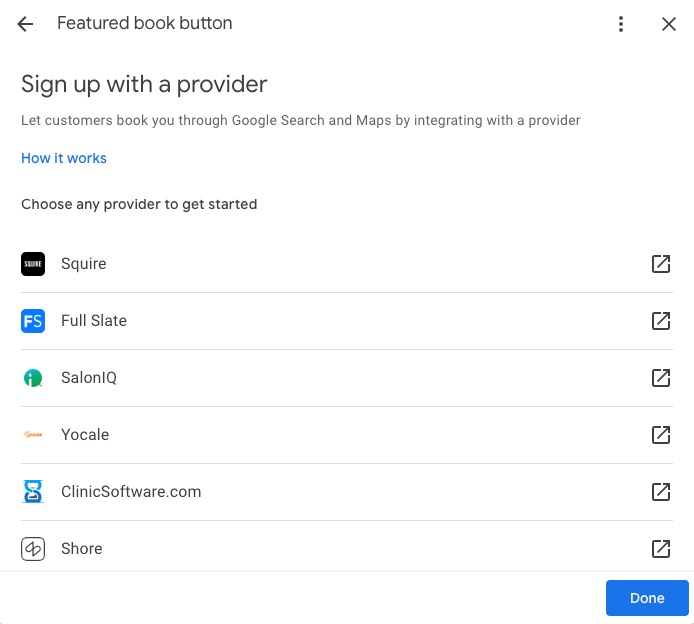
3. Log in and Follow Platform-Specific Instructions:
Once you select your platform, you’ll likely be directed to their website. Log in to your account and follow the specific instructions provided by your chosen scheduling platform. These instructions will guide you through the connection process to integrate your platform with Google Reserve.
4. Wait for Google’s Confirmation (up to 1 week):
After completing the setup on your scheduling platform’s side, Google advises it may take up to one week to link your chosen provider with your Business Profile. Be patient, and you’ll soon be able to reap the benefits of Google Reserve!
What does it look like and how does it work?
See How Google Reserve Simplifies Bookings for Your Customers
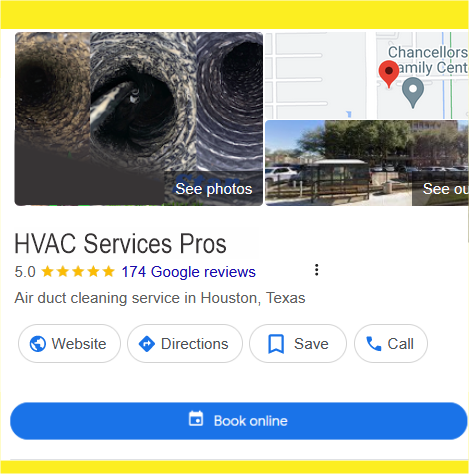
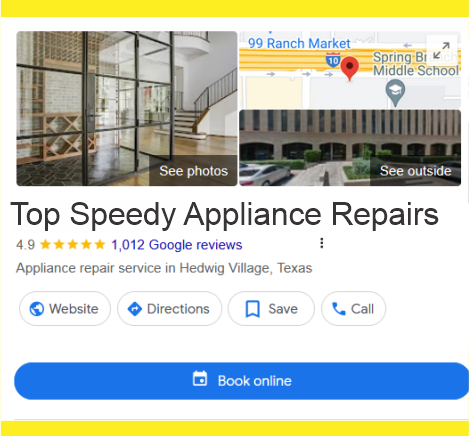
Imagine this: a potential customer searches for HVAC repair near them on Google. Your business listing pops up, and right there, they see a “Book Appointment” button. With a few clicks, they can schedule a repair directly through your Google Business Profile – no need to call or visit your website. That’s the power of Google Reserve (if available in your area).
Here’s a breakdown of how it works for your customers:
1. Effortless Booking Button:
When a customer searches for your HVAC and appliance repair services, and you’ve activated Google Reserve, they’ll see a prominent “Book Appointment” button on your Google Business Profile. This button eliminates the extra step of navigating to your website for scheduling.
2. Clear Service Options:
Clicking the button brings them to a list of services you offer (e.g., diagnosis, specific appliance repair). This ensures they choose the most relevant appointment for their needs.
3. Convenient Scheduling:
Once they select a service, they can view your available appointment slots and choose a date and time that fits their schedule. This transparency builds trust and reduces back-and-forth communication.
4. Simple Confirmation:
After selecting a time, they can confirm the booking and agree to your terms and conditions. A confirmation screen appears, followed by an email and text message confirmation (depending on your contact preferences). This keeps everyone informed and minimizes the risk of missed appointments.
By implementing Google Reserve, you streamline the booking process for your customers, leading to a smoother experience and potentially more appointments for your HVAC and appliance repair business.
Where can I see all of my bookings?
Stay on Top of Appointments: Managing Bookings with Google Reserve
Google Reserve simplifies appointment scheduling for your HVAC and appliance repair business, but where do you manage those bookings? Here’s a breakdown for both you and your customers:
For Your Customers:
Once they book an appointment through Google Reserve, they can view and manage it directly through their Google emails or the Google Calendar app. This provides them with easy access to appointment details, reducing the need for follow-up calls or emails from your end.
For Your Business:
You won’t manage appointments directly through Google Reserve. Instead, all bookings will seamlessly flow into your existing compatible scheduling platform (like Appointy, Bookeo, or Square Appointments). This means you can continue managing appointments within the familiar interface you already use, ensuring a smooth transition and avoiding the need to learn a new system.
Maximizing Efficiency:
By leveraging Google Reserve and your chosen scheduling platform together, you can streamline your booking process and centralize appointment management. This allows you to:
- Focus on what matters most – repairing appliances and keeping your customers happy.
- Reduce administrative tasks and save valuable time.
- Minimize the risk of missed appointments by keeping both you and your customers informed.
This guide will delve deeper into managing bookings with Google Reserve, ensuring you leverage its full potential for your HVAC and appliance repair business.
How do I measure the success of Reserve with Google?
Track Your Success with Google Reserve Analytics
So, you’ve activated Google Reserve for your HVAC and appliance repair business. How can you measure its impact? Here’s how to access valuable insights and track your success:
1. Monitor Booking Numbers:
Within your Google Business Profile’s “Promote” section, you’ll find a “Performance” subsection if you have Reserve with Google enabled. This section displays the number of bookings made directly through your Business Profile. This is a key metric to gauge customer adoption of the booking button and its overall convenience factor.

2. Leverage Google Business Profile Manager Insights:
If you have access to “Insights” within Google Business Profile Manager, you can unlock even richer data. Here, you can choose a specific timeframe and view metrics like:
- Total Revenue Generated: Track the total revenue brought in through appointments booked via Google Reserve. This helps you directly measure the return on investment for using Google Reserve.
- Most Popular Services: Identify which repair services are most frequently booked through Google Reserve. This data can help you tailor your service offerings or highlight in-demand services on your website.
- Total Customers and Booking Frequency: See the total number of customers who’ve booked appointments and how many times they’ve used Google Reserve. This helps understand customer loyalty and the platform’s effectiveness in driving repeat business.
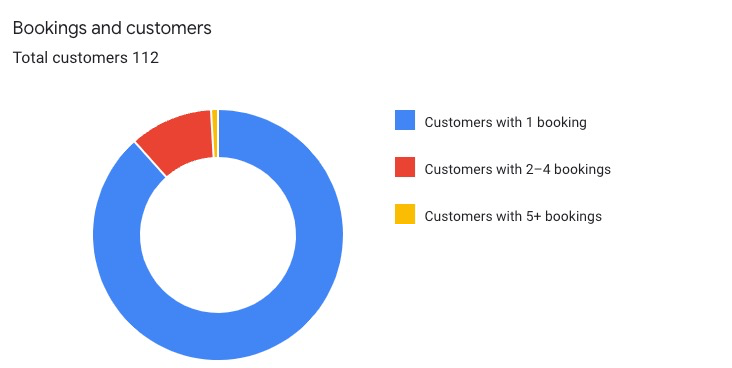
Important Note: Currently, these advanced booking metrics aren’t available directly through the Google Business Profile editing and management experience accessible through search. Additionally, Google excludes “Insights” for businesses certain categories, so keep that in mind if your HVAC and appliance repair business falls under that classification.
Despite these limitations, Google Reserve offers valuable booking data to help you assess its effectiveness for your HVAC and appliance repair business.
Booking requests via messaging
Clarify Customer Messaging vs. Google Reserve Bookings
While Google offers features to connect with customers, it’s important to understand the difference between booking requests via GBP messaging and the “Reserve with Google” platform for HVAC and appliance repair businesses.
Messaging for Appointment Inquiries (Not Google Reserve):
- Availability: This feature might not be available for all HVAC and appliance repair businesses on Google Business Profiles. It depends on your specific business category.
- Function: If enabled, you might see a “message” button on your profile allowing customers to initiate appointment inquiries.
- Process: Customers can’t directly book appointments through messaging. Instead, they’ll describe their request and preferred service time.
- Communication: You’ll receive a message notification (if enabled) and an email with the customer’s request details. You can then respond with your available appointment slots. The customer confirms the final booking time directly with you.
Google Reserve for Direct Bookings (if available):
- Availability: This platform streamlines the booking process by allowing customers to schedule appointments directly through your Google Business Profile. (Note: Check eligibility for your business).
- Function: Customers see a prominent “Book Appointment” button and can choose a service, date, and time that suits their needs.
- Process: The entire booking is managed through Google Reserve, eliminating the need for back-and-forth communication. You receive notifications and manage appointments within your compatible scheduling platform.
Understanding the Difference:
Knowing the distinction between messaging and Google Reserve helps you manage customer interactions effectively. Google Reserve automates bookings, while messaging allows for initial contact and discussion before confirming an appointment.
This guide will delve deeper into both functionalities, so you can leverage them to their full potential and provide a seamless experience for your HVAC and appliance repair customers.
Adding an appointment link
Maximize Booking Options with Google Reserve and Appointment Links
Google Reserve (if available in your area) offers multiple ways to capture appointments. Here’s how to leverage both Google Reserve and appointment links to provide maximum convenience for your customers:
Streamlined Booking with Google Reserve: This platform allows customers to schedule appointments directly through your Google Business Profile. They see a “Book Appointment” button, choose a service and time slot, and confirm the booking – all within Google. This eliminates the need for them to visit your website, saving them time and effort.
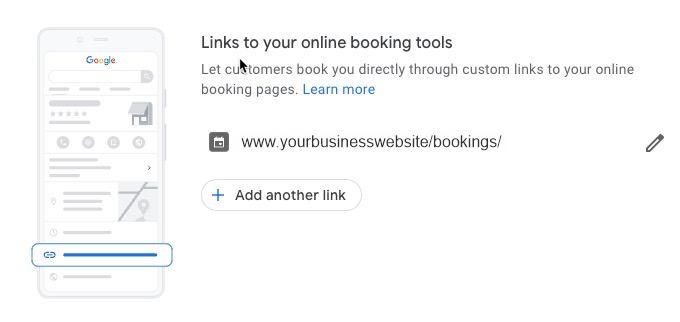
Additional Booking Option with Appointment Links: Even if you leverage Google Reserve, you can add an “Appointment Link” to your Business Profile. This link can direct users to a dedicated booking page on your website. This might be useful if you offer specific services or promotions not reflected in Google Reserve, allowing customers to explore those options before booking.
By utilizing both Google Reserve and appointment links strategically, you cater to different customer preferences:
- Convenience Seekers: Google Reserve provides a quick and easy solution for those who want to book instantly through Google.
- Detailed-Oriented Customers: The appointment link gives users the option to explore your booking page for additional information before committing.
Pros and Cons of Reserve with Google
Consider These Pros and Cons Before Using Google Reserve for Your HVAC and Appliance Repair Business
Thinking about activating Google Reserve for your HVAC and appliance repair business? It offers a convenient booking option for customers, but it’s important to weigh the benefits and drawbacks before integrating it with your scheduling system.
Understanding the Terms of Service:
Before connecting Google Reserve to your existing scheduling platform, take time to thoroughly read and understand the terms of service for both parties. Here are the relevant links:
- Google Reserve Terms of Service: https://www.google.com/maps/reserve/
- Example Scheduling Platform Terms (Square Appointments): https://squareup.com/us/en/legal/general/ua
Understanding these terms will ensure you’re aware of any potential limitations or fees associated with using Google Reserve.
Pros of Google Reserve:
- Simplified Booking for Customers: Customers can book appointments directly through your Google Business Profile, eliminating the need for phone calls or website navigation. This convenience can significantly boost your booking rates.
- Attract New Customers: According to a survey (source not provided but can be added if found), bookings via Google Reserve tend to be from new customers. This presents a great opportunity to expand your customer base and acquire new business.
Cons of Google Reserve:
- Limited Functionality for Complex Bookings: If your services involve lengthy sign-ups or waivers, Google Reserve might not be ideal. The booking flow can’t be customized to include these additional steps, potentially leading to confusion or incomplete bookings.
Making an Informed Decision:
By carefully considering the pros and cons, and familiarizing yourself with the terms of service, you can determine if Google Reserve is a valuable tool for your HVAC and appliance repair business. This guide will delve deeper into the setup process and other considerations to help you make an informed decision.
What if I want to turn off bookings?
Pausing or Disabling Google Reserve (if available)
Thinking about giving Google Reserve a try but unsure about a long-term commitment? Here’s the good news: even after activating it for your HVAC and appliance repair business, you have the flexibility to pause or disable it if needed.
Disabling Google Reserve:
If you decide Google Reserve isn’t the right fit for your business, you can easily disable it. However, the process doesn’t happen directly through Google Business Profile. Here’s what you need to do:
- Contact Your Scheduling Platform: Reach out to your chosen scheduling platform (like Appointy, Bookeo, or Square Appointments). They’ll be able to guide you through the steps to remove the link between your Google Business Profile and their scheduling solution for your business.
Conclusion:
Should You Use Google Reserve for Your HVAC and Appliance Repair Business?
Tired of juggling phone calls and emails for appointments? Google Reserve (if available in your area) can be a game-changer for HVAC and appliance repair businesses. It allows potential customers to book directly through your Google Business Profile, streamlining the process and potentially boosting bookings. But is it right for your business?
Here’s a breakdown to help you decide:
- Convenience for Customers: Google Reserve offers a smooth booking experience, attracting customers who prefer immediate scheduling through Google. This can significantly increase your booking rates.
- New Customer Acquisition: Studies suggest bookings via Google Reserve often come from new customers. This presents a great opportunity to expand your reach and acquire new business.
- Compatibility Considerations: Google Reserve integrates with various scheduling platforms. However, it might not be ideal for services with lengthy sign-up processes or pre-qualification requirements, as the booking flow can’t be customized for these steps.
Making an Informed Choice:
Weighing the pros and cons, and understanding your specific needs, will help you decide if Google Reserve is a valuable tool. This guide will explore:
- Eligibility and Setup: How to check if you’re eligible and how to activate Google Reserve with your compatible scheduling platform.
- Managing Bookings: How to see and manage appointments booked through Google Reserve.
- Tracking Performance: How to access booking data and measure the success of Google Reserve for your business.
- Alternatives: Exploring other booking management strategies if Google Reserve isn’t the best fit.
By considering all the aspects, you can determine if Google Reserve can help streamline booking and boost your HVAC and appliance repair business.
Learn more from other related posts
HVAC & Appliance Repair Guide to Google Maps Ads and Promoted Pins
Monitoring Google Business Profile for Your HVAC or Appliance Repair Company
Google Business Profile Messaging for Appliance Repair and HVAC Companies
How To Use Keywords In Google Business Profile For HVAC & Appliance Repair Businesses
Ready to Streamline Bookings and Boost Your HVAC & Appliance Repair Business?
Don’t wait! Simplify appointment scheduling, attract new customers, and free up your time to focus on what matters most – repairing appliances and keeping your customers happy.
Here’s what you can do next:
- Check this guide for a step-by-step breakdown on setting up Google Business Profile Bookings and Appointments for your HVAC and appliance repair business.
- Explore the rest of our guide to unlock valuable tips on managing bookings, tracking performance, and maximizing your Google Reserve experience.
- Want to go beyond Google Reserve and optimize your entire Google Business Profile for maximum impact? Our expert digital marketing and SEO team can help! We specialize in crafting customized GBP optimization strategies specifically designed for HVAC and appliance repair businesses. Our marketing strategies, including powerful hvac ppc company campaigns and local seo for appliance repair, will help you generate tons of leads and keep your appointment calendar full.
Contact us today for a free consultation and see how we can help your business thrive!
Want to See How This Works in Practice?
Most appliance repair and HVAC businesses don’t lose jobs because of marketing — they lose them because homeowners don’t trust what they see online. Watch the free training that shows how reputation automation turns everyday jobs into long-term visibility, trust, and more completed jobs.
Watch the Free Training