A question I often hear from HVAC or appliance repair business owners is: “Do we really need call tracking for ac repair or appliance service? It seems like an additional expense we can do without.”
This provides an interesting perspective to talk about the benefits of call tracking and reporting for local HVAC or appliance repair companies, as well as an opportunity to discuss the potential negative repercussions of not doing it.
Why Local Businesses Need Call Tracking
Local HVAC or appliance repair businesses need call tracking for several reasons. Here are some of the critical reasons why call tracking is essential for these businesses:
#1. Google Business Profile Insights Only Track Calls from Mobile
For local HVAC or appliance repair businesses, having a Google Business Profile (GBP) is crucial for attracting new customers. However, relying solely on GBP Insights data to assess the performance of your business profile may not provide an accurate representation of all calls received.
GBP Insights only tracks calls made from a mobile device, meaning calls made from a computer are not counted. This could lead to missed opportunities and inaccurate data. By implementing call tracking, you can accurately track all calls made to your HVAC or appliance repair business, regardless of the device used to make the call.
Here’s an example: comparing one month of GBP Insights data to call tracking metrics data for the same business during the same month revealed an additional 54 calls that would have been missed if call tracking was not in place.
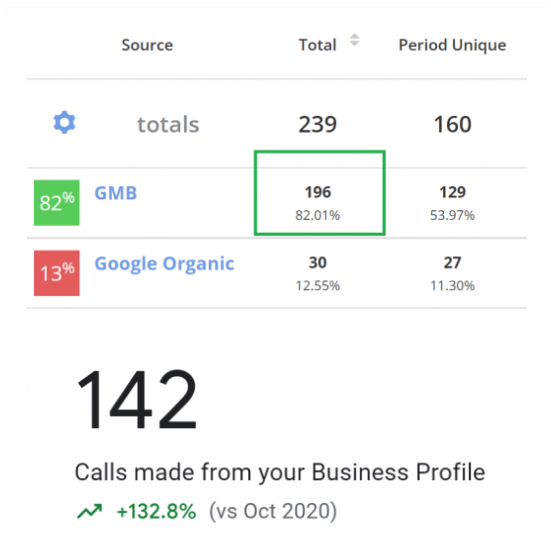
It’s important to note that GBP Insights do not track unique visitors, so multiple searches or clicks from the same user are counted multiple times. Call tracking allows you to segment data by unique calls, providing a more accurate representation of your business’s performance.
Overall, call tracking is a valuable tool for local HVAC or appliance repair businesses that want to accurately track calls and optimize their marketing efforts to drive business growth.
#2. You Can Record Calls
Recording calls may seem like a tedious and time-consuming task, but it can provide valuable insights and uncover potential issues with your HVAC or appliance repair business.
For instance, listening to calls may reveal that customers are asking the same question repeatedly or are encountering issues with your service. By identifying these issues, you can take steps to address them and improve the customer experience.
Here’s an example: A customer calls to schedule an appointment for an appliance repair but has difficulty navigating your website to find the appointment scheduler. Recording this call can help you identify and address website usability issues, improving the overall customer experience.
It’s important to note that recording calls without the customer’s consent is illegal in some states. If you choose to implement call tracking and call recording, ensure that the client is aware and has given consent. This can also serve as an opportunity to show your commitment to transparency and excellent customer service.
In summary, call recording through call tracking can help you identify and address issues with your HVAC or appliance repair business, improving the overall customer experience and driving business growth.
#3. You Can Label Calls to Assess Quality
Another benefit of call tracking and recording for local HVAC or appliance repair companies is the ability to label calls to assess the quality of customer service. By setting up a system for labeling calls, you can gain valuable insights into how well your staff is handling customer inquiries and complaints.
To start, create a taxonomy or call label legend that you can use consistently when reviewing calls. Here’s a sample legend that you can use:
- New customer inquiry
- Existing customer inquiry
- Caller hung up
- Wrong number
- Service request
- Sales inquiry
- Telemarketer
- Voicemail
After creating your taxonomy, listen to the calls and label them accordingly. This will allow you to filter your reports based on the labels you applied to the calls.
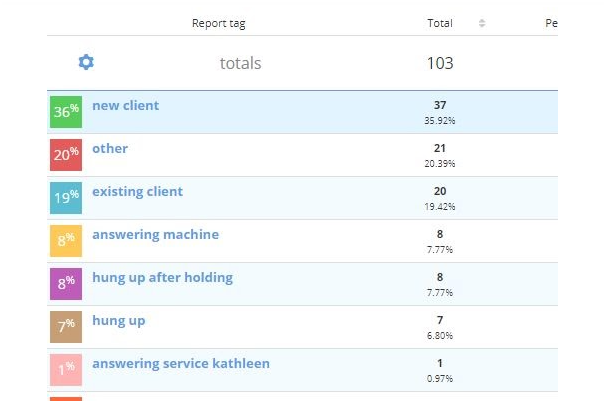
By analyzing the labeled calls, you can identify any recurring issues or concerns that customers have and train your staff accordingly. You can also share these insights with your clients and demonstrate how your business is committed to providing excellent customer service.
For example, if you notice that a high percentage of calls are going unanswered or being sent to voicemail, you can take steps to improve your phone handling procedures and ensure that customers are receiving prompt and efficient service.
#4. Measure marketing performance
By using call tracking, you can determine which marketing campaigns are generating the most calls and leads for your HVAC or appliance repair business. This information allows you to optimize your marketing efforts, reduce unnecessary costs, and focus your resources on the campaigns that are bringing in the most business.
#5. Improve customer service
Call tracking allows you to monitor and evaluate how your staff interacts with customers during calls. You can use this information to identify areas where your team may need additional training or support to improve the quality of customer service.
#6. Increase sales
Call tracking enables you to track the outcomes of your customer calls, including leads generated, appointments booked, and sales closed. You can use this information to analyze your sales funnel, identify bottlenecks, and make changes that can increase your conversion rates and revenue.
Overall, call tracking is an essential tool for local HVAC or appliance repair businesses that want to improve their marketing, customer service, and sales performance. By using call tracking, you can optimize your business operations and gain a competitive edge in your local market.
How We Set Up Call Tracking for Local Companies
At our agency, we understand the importance of call tracking for local HVAC or appliance repair companies. That’s why we typically use Call Tracking Metrics, Call Rail, or Call Tracking Analytics with all of the businesses we work with. Each platform has its own unique features that can help businesses to track their calls and measure their marketing ROI.
Call Tracking Metrics is a cloud-based call tracking and automation platform that allows businesses to track calls and monitor the performance of their marketing campaigns. It offers advanced features such as call recording, caller ID, call routing, and call analytics.
Call Rail is another call tracking platform that provides businesses with call tracking, call recording, and call analytics features. It offers a user-friendly interface and can be easily integrated with other marketing tools, such as Google Analytics and AdWords.
Call Tracking Analytics is a call tracking and analytics platform that provides businesses with real-time call data and insights. It allows businesses to track their calls, measure their marketing ROI, and make data-driven decisions.
When setting up a new call tracking account, we consider the specific needs of each business and choose the platform that best fits their requirements. Once the business signs up and shares the login information, we work with them to get the account set up and ensure that the tracking is accurate and effective. With call tracking, local HVAC or appliance repair companies can gain valuable insights into their marketing performance and improve their customer service.
It’s important to note that we always advise our clients to set up their own call tracking accounts. We usually send them an email with instructions on how to set up the account and share the login information with us. Here’s an example of what the email might say:
“To track your phone calls from ads and organic traffic effectively, please sign up for an account at http://calltrackingmetrics.go2cloud.org/SH5n and email us your login credentials. This will enable us to track your ROI, optimize your advertising campaigns, and ensure that you get the best return on your investment. The Business Plan is all you need.”
Once we receive the login information, we can start setting up the account for the local HVAC or appliance repair business.
- Log into the call tracking account (such as Call Tracking Metrics, Call Rail, or Call Tracking Analytics) and add yourself and the account manager as users.
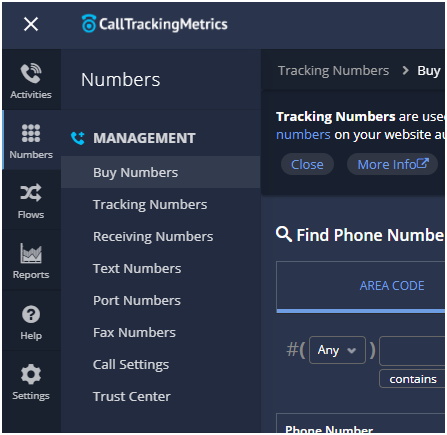
- Purchase phone numbers based on the client’s needs. If they have both SEO and SEM, it’s recommended to purchase seven numbers. If the business is not running ads, then purchase five numbers, and if they’re only running ads, then two numbers will suffice. It’s important to make sure that the area code matches the location of the business or use a toll-free number if applicable.
- a. Organic Search (Google) – onsite
- b. Paid Search (Google Ads) – onsite
- c. Organic Search (Bing) – onsite
- d. Organic Search (Yahoo) – onsite
- e. Location & Call Extension – offsite
- f. Google Business Profile (onsite)
- g. Google Business Profile – offsite (see here)
-
- For each of the numbers purchased, configure them accordingly. Call Rail and Call Tracking Metrics should have automatic source detection for all numbers, except for the Location Extension. Make sure to label each number properly. Usually, the default settings for numbers are kept, which leaves call recording on.
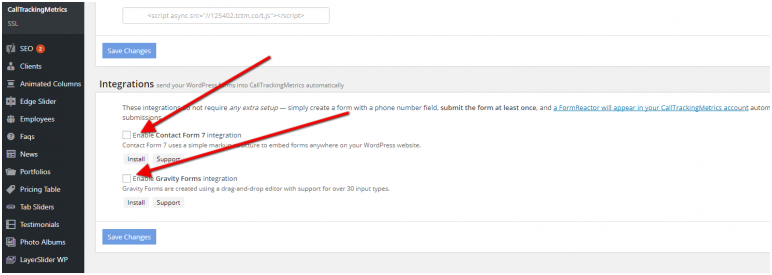
- If the business’s website is built on WordPress: a) Install the Call Tracking plugin on WordPress and activate it. Then, go to the plugin’s settings and add the access key and secret key. You will also need to enable API integration in the “account settings” section of the Call Tracking dashboard. b) In the WordPress plugin settings page, uncheck the boxes to disable Contact Form 7 and Gravity Form integrations.
-
- Check to make sure the numbers are swapping by opening an incognito tab and using the format “domain.com/?gclid=test.” You should see the new number.
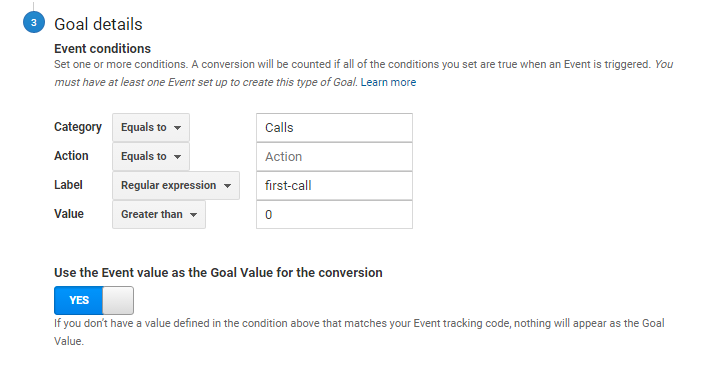
- Set up a goal called “Calls” (CTM or CallRail) in Google Analytics. Choose “Calls” for the category, leave “Action” blank, enter “first-call” for the label, and set the value to 0 as shown below.
- Link the call tracking account to Google Analytics in the account settings.
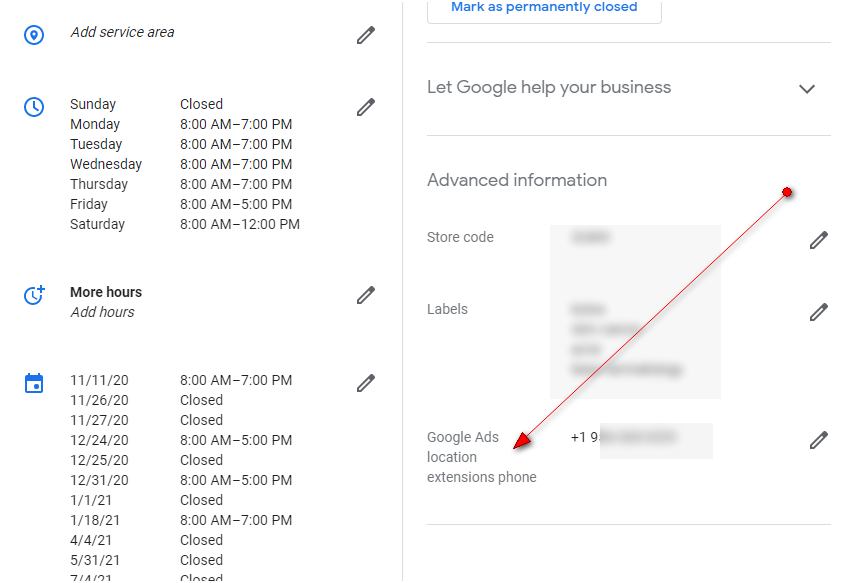
- Log into the Google Business Profile (GBP) and set the tracking number for the call/location extension. Insert this number into the tracking number section under “edit business details.” Repeat this step for all of the company’s listings if they have more than one.
- Reassign the task to the Google Ads manager to create the call extension and sync it to the call tracking account.
- Provide the following instructions for the call extensions to the Ads team.
Google Call Extensions and Call-Only Ad Troubleshooting (Performance plan)
If you are a local HVAC or appliance repair company using CallTrackingMetrics to track your ad extension calls but are not seeing advertising data, first ensure that you have set up the CTM integrations. This integration must be enabled in order for Google to send advertising data to your call log in CTM. Make sure to check that the Google Ads and CTM accounts are linked properly and that the correct phone numbers are being used in your ad extensions. If you are still having issues, contact your Google Ads manager for further troubleshooting.
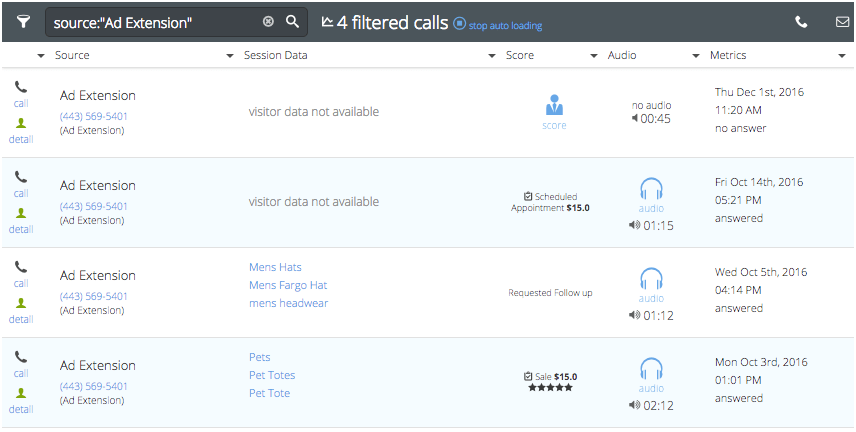
If you have followed all the previous steps and are still not able to see the call data campaign associated with the call, then you can check the Google Ads call detail reports to see if Google is tracking the calls. Google requires proof to verify that the call was a paid one from Google in order to count it as a conversion in Ads.
Please note that in order to match campaign data to a call, both Google and CTM must track the call. This happens through a double forward process, where a Google forwarding number forwards to a CTM tracking number.
To check whether Google is tracking your calls, follow these steps:
- Go to the Reporting section of Google Ads and select Predefined Reports → Extensions.
- Choose Call details from the tab view.
- Make sure the time frame in CTM and Ads matches.
- Check Google’s call detail report. If phone calls aren’t reported, campaign data won’t match to CTM.
- If Google reports phone calls but CTM doesn’t, it means the call wasn’t made using a CTM tracking number.
- If both Google and CTM report phone calls but without campaign data, the integration may not be set up properly. Check that the script is running hourly, since if it’s not, Google can’t pass visitor data to CTM.
Q) Why would Call Tracking Metrics (CTM) track a call from the source of call extension and Google Ads would not?
A) This could happen if Google forwarding numbers were not enabled or available at the time of the search. To ensure that campaign data passes through, it must be a double forward process: a Google forwarding number forwarding to a CTM tracking number.
More about Google forwarding numbers.
Google forwarding numbers are a feature offered by Google Ads that allows businesses to use unique phone numbers in their ads to track call conversions. When a customer clicks on the ad and calls the number displayed, Google can track the call and provide valuable data to the business, including the duration of the call, call start time, and caller area code.
A Google forwarding number is a unique phone number that is dynamically generated by Google and inserted into the ad. When a user clicks on the ad and calls the number, the call is routed through Google’s servers, which track the call data and report it back to the business.
One advantage of using Google forwarding numbers is that they can help businesses track the effectiveness of their ad campaigns. By tracking the number of calls generated by each ad, businesses can gain valuable insights into which campaigns are generating the most leads and conversions.
However, as mentioned earlier, for campaign data to pass through, it has to be a double forward → Google forwarding number forwarding to → CTM tracking number. Therefore, businesses that use CTM to track calls from Google Ads must ensure that their CTM and Google Ads accounts are properly integrated and that the Google forwarding numbers are set up correctly to avoid any issues with call tracking.
Overall, Google forwarding numbers can be a useful tool for businesses looking to track call conversions and optimize their ad campaigns. However, it’s important to ensure that the tracking is set up correctly and that any issues with call tracking are promptly addressed to ensure accurate data and a successful campaign.
How to Track Calls on your Website from the Google Business Profile
When it comes to tracking for local HVAC or appliance repair services, we’re usually talking about keyword rank tracking. However, one of the best metrics to report on for your local campaigns is the amount of leads that came in through phone calls. For that, you will need a robust call tracking setup. Call tracking has come a long way in the last few years and maybe you didn’t realize that you can do a lot more than you thought with tracking on your Google Business Profile (GBP), formerly known as GMB, so let’s go through a complete call tracking number setup for your business profile, so you can track and attribute all those leads properly.
Basic Call Tracking Setup
The first step is to log in to your Google My Business (GMB) dashboard and locate the phone number field in the Info tab.
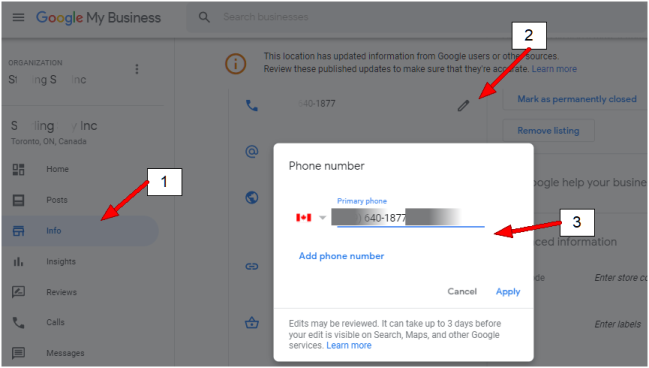
For a basic call tracking setup, after accessing the phone number field in your business listing dashboard, you should move your original phone number to the additional phone number field and designate your tracking number as the primary one. This way, all calls made to the primary number will be tracked and recorded by your call tracking system. It’s important to note that this change will also update the phone number displayed on your Google Business Profile to the tracking number, so make sure to inform your customers or clients of the new number.

But What About NAP Consistency?
Maintaining NAP (Name, Address, Phone Number) consistency is crucial for local SEO. It ensures that search engines and users can easily identify your business across different platforms. When implementing call tracking, it’s important to ensure that your NAP remains consistent.
To do this, you can keep your original phone number in the additional phone number field of your Google listing while using the tracking number as the primary number. This way, Google can still match your business information across various directories, citations, and your website.
However, simply maintaining NAP consistency is not enough. To fully leverage call tracking for your local HVAC or appliance repair business, you can explore additional strategies such as using dynamic number insertion on your website, integrating call tracking with Google Analytics, and setting up call recording and transcription. These advanced features can provide valuable insights into your customer’s behavior and help you make data-driven decisions to improve your local SEO strategy.
Tracking Onsite Google Business Listing Phone Calls
Now that you have set up an offsite number for your local HVAC or appliance repair company on your Google Business Profile, it’s time to track the calls that originate from your website. It is important to note that an offsite number does not change on your website and can cause issues with tracking leads that come from your Google listing and end up on your website.
To properly track these leads, you need to set up an onsite number that changes depending on the visitor’s source. For example, if a visitor clicks on your local business listing and then goes to your website, the phone number on the website should automatically update to match the number on the listing. This will ensure that you can properly track these leads.
The process for setting up an onsite number will vary depending on the call tracking software you use. For Call Tracking Metrics, you will need to configure the website phone numbers to swap based on the entry from the business profile and distinguish between a visitor from a Google organic search result and a visitor from your Google listing.
Adding UTM Tracking Parameters
For your local HVAC or appliance repair company, the first step is to set up UTM tracking parameters on your Google Business Profile (GBP). This will allow you to track the source, medium, and campaign of website traffic coming from your GBP. Your website URL with UTM parameters should look something like this:
https://www.example.com/?utm_source=google&utm_medium=organic&utm_campaign=website
Make sure to set up UTM tracking parameters for both the website and appointment fields in your business profile to properly track leads and appointments generated from your GBP.
Setting Up An Onsite Tracking Number
Setting Up An Onsite Tracking Number When you purchase a new tracking number for your local HVAC or appliance repair business, designate it as an onsite number. A tracking code will need to be installed on your site for this to work, which is standard for call tracking software.
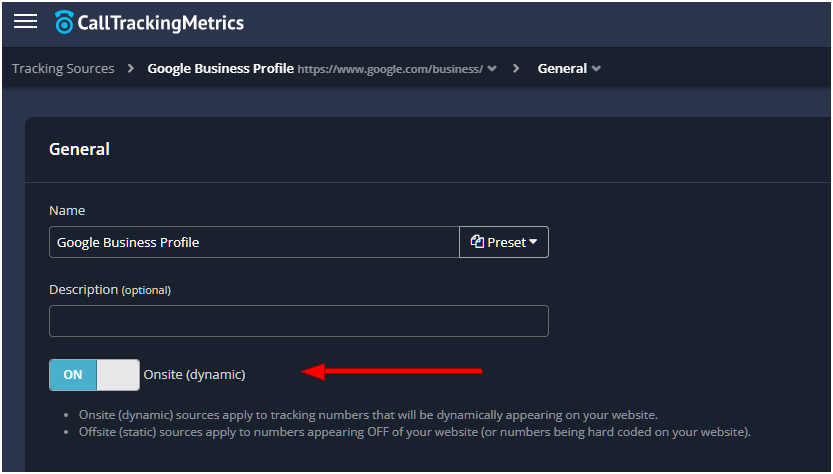
After you’ve designated your new tracking number as an onsite number, the next step is to update the Conditions section for your number to swap on. In the landing URL tab, enter the UTM code that you previously added to your local HVAC or appliance repair company’s website and appointment fields on Google Business Profile. This will ensure that the onsite tracking number will be displayed for visitors who came to your website through your Google Business Profile.
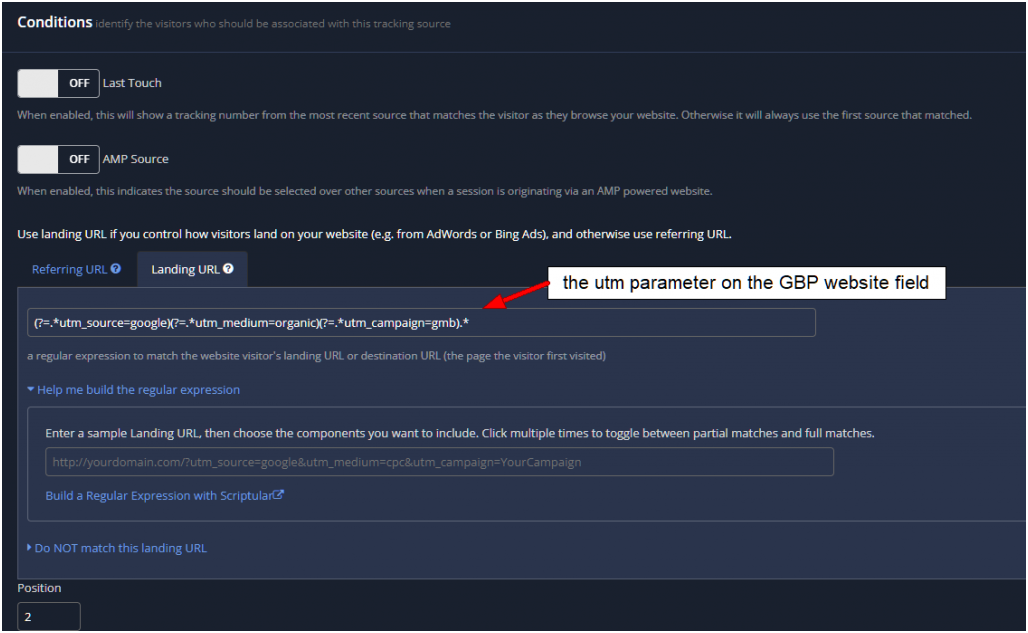
With the new setup, when a potential customer clicks through to the website from your local HVAC or appliance repair company’s Google Business Profile listing, the phone number displayed on the website will automatically change to match the number you added to your GBP field. It’s important to note that if you’re using Call Tracking Metrics, you’ll need to set the position of the GBP number lower than the organic number to distinguish between an entry from the GPB listing and an organic search result.
GBP Tracking Summary
To set up call tracking for your local HVAC or appliance repair business, follow these steps:
- Purchase a new tracking number and designate it as an onsite number.
- Add call tracking code to your website.
- Add the new tracking number as the primary number in your Google Business Profile (GBP) and move the original number to the additional field.
- Add UTM tracking parameters to your website, GBP, and appointment fields.
- Add the UTM parameters in the Conditions area for your tracking software.
- Set the Position as low as possible if a Google organic call tracking is also being used.
By following these steps, you can accurately track phone calls that come from your GBP listing and your website, allowing you to better understand how customers are finding and engaging with your business.
The Conclusion
Now that you have your call tracking set up for your local HVAC or appliance repair company, you’re in a position to provide your clients with monthly reporting that tells them:
- How many calls they received
- Where they came from (GBP vs organic sources vs ads)
- How good or bad the quality of the calls were
- Where you need to focus more efforts and/or focus less effort
As an HVAC or appliance repair company, presenting month-over-month call data in a graph can help your clients understand whether calls are trending up, down, or are flat. When calls are trending down or staying flat, it’s a sign that you need to investigate the cause and adjust your marketing efforts accordingly.
Learn more from other posts related to Call Tracking & Google Business Profiles
Maximize Your Business Growth with Our Call Tracking Setup & SEO Services
As a business owner in the HVAC or appliance repair industry, you know that generating leads is critical to your success. But are you tracking where those leads are coming from? With our HVAC SEO company, we can set up call tracking for your business to help you identify which sources are driving the most leads. This data is invaluable in helping you make informed decisions about where to focus your marketing efforts and which areas of your business to improve.
In addition to call tracking, we offer SEO and Google My Business optimization services to help you increase your online visibility and attract more customers. By partnering with us, you’ll have access to a team of experts who will work with you to create a customized strategy that meets your specific business goals. Don’t let your competitors get ahead – take advantage of our HVAC SEO company services today and start seeing the results for yourself.
Why Most Lead Strategies Fail Without Trust
Traffic and leads only work when homeowners trust what they see. Watch the free training that explains how reviews, recency, and reputation now determine who actually gets hired.
Watch the Free Training